Mount NTFS drive on Macos
To copy files from the mac to the external drive.
- Connect your NTFS drive to your Mac.
- Go to the Launchpad on the Dock > Other > Terminal. Or, you can open Terminal in Finder.
- Enter the command below into the Terminal window. This opens all the drives recognized by your Mac. sudo nano /etc/fstab
- Press the arrow keys on the keyboard to scroll to the end of the list and then type the following command. You need to replace NAME with the name of your NTFS drive. LABEL=NAME none ntfs rw, auto, nobrowse
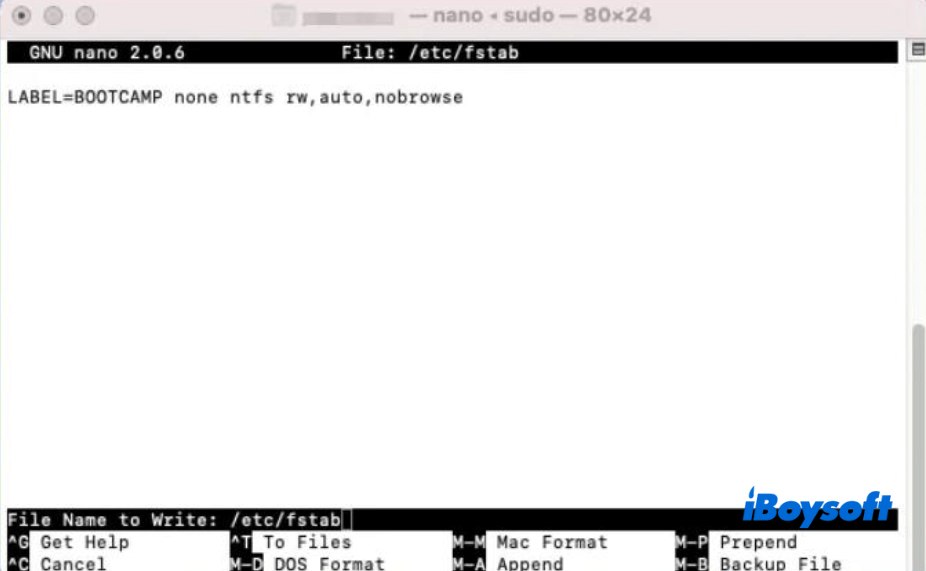
- Press the Control + O keys. Then, press the Control + X keys.
- Open Finder and navigate to the top Finder menu bar, then choose Go > Go to Folder.
- Enter /Volumes/NAME into the Go to Folder box. Here, replace NAME with the name of your NTFS drive.
- Select Go to open your NTFS device.
Now, you can copy files to your NTFS drive on your Mac.